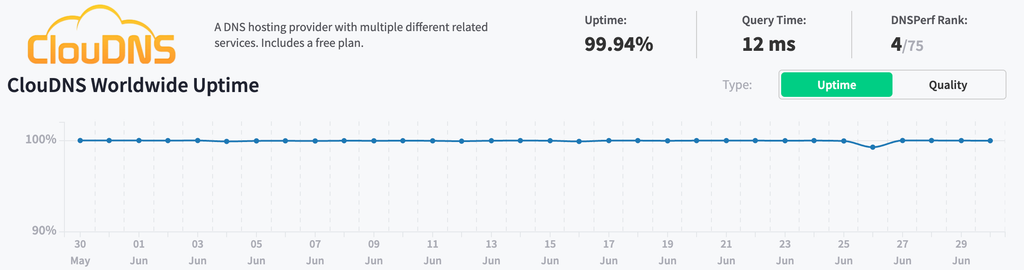
On 2026-06-26, every ClouDNS Premium anycast nameserver for my zones and my friend’s zone experienced a major outage – periodic timeouts on UDP/53 within a ~20-minute window:
~12:39 UTC (21:39 JST) — first symptom: my friend’s domain failed to resolve due to a DNS timeout (;; communications error to <ip>#53: timed out), as his NS vanities point to pns41–44. ~12:44 UTC (21:44 JST) — reproduced directly against my own zones (pns1–4). ~12:59 UTC (21:59 JST) — last observation; recovered on its own shortly after.
IPs in Premium Anycast timed out, plus the standard ns3. The standard ns1/ns2/ns4 answered normally throughout. (However, note that ns1 is a problematic server, as I mentioned in my past article, and I do not recommend using it as the +1.)
Four groups of anycast nameservers, yet somehow they provide no redundancy between one another. BGP misconfiguration? A bad rollout? There’s no way to tell, as there’s zero public statement from ClouDNS themselves – support ticket only confirmed a “temporary technical situation” in their reply, with zero detail about what went wrong, and they don’t have a status page as far as I know.
The fix: 3+1 (or 4+1 if you prefer)
Replace one of the four anycast nodes with one of ClouDNS’s standard (unicast) nameservers. Three premium anycast for speed, one standard unicast on a separate network as insurance.
Test a few standard nameservers directly and pick one that’s both well-routed from your audience and on a different network from the anycast fleet:
A newly disclosed Linux kernel vulnerability, CVE-2026-31431 (“CopyFail”), gives any unprivileged local user an instant, unconditional root shell on virtually every Linux distribution shipped since 2017 – including Ubuntu, RHEL, Amazon Linux, and SUSE.
Unlike previous high-profile kernel exploits, the entire proof-of-concept is a 732-byte Python script using only the standard library. It exploits a logic flaw in authencesn to perform a controlled page-cache write, patching any setuid binary in memory without touching disk – bypassing file integrity tools and crossing container boundaries.
Exploitation requires only an unprivileged local shell; no race condition, no kernel offsets, no compiled payload.
Immediate action required. As a stopgap, disable algif_aead via modprobe (details):
Then prioritize kernel patching to 6.18.22+, 6.19.12+, or 7.0+.
Note that some distributions – including Debian – had not released a patched kernel as of 2026-04-30 03:00 UTC; monitor your vendor’s security advisories closely (Debian tracker). 2026-05-02 Update: linux-image-6.12.85+deb13-amd64 has been released.
CI runners, shared hosts, and Kubernetes nodes are highest priority.
I run a small setup with fail2ban protecting nginx and SSH. The setup worked fine – fail2ban watches logs, detects attackers, and bans them via firewalld. Nothing exotic.
After accumulating hundreds of bans across my f2b jails, fail2ban-client reload became noticeably slow. The default firewallcmd-multiport action adds one firewall rule per banned IP, so every reload rebuilds hundreds of individual rules.
Enter IPSet, per Claude, instead of one rule per IP, it stores all banned IPs in a kernel-level hash table behind a single firewall rule. Lookup is O(1) regardless of how many IPs are in the set. Fail2ban already ships with firewallcmd-ipset.conf, so the switch is just a config change:
This site was recently migrated to ClouDNS from DNSMadeEasy. Everything went smoothly, especially with Claude’s help automating the migration script via zonefile and API.
However, during post-migration testing, I found a weird behavior with ClouDNS’ Premium plan nameservers: they return 127.0.0.1 as an authoritative answer for domains that are not hosted on their system.
For example, querying pns1.cloudns.net for google.com – a domain that obviously has nothing to do with ClouDNS:
Note the aa (authoritative answer) flag in the response. This server is claiming to be authoritative for google.com, returning 127.0.0.1 with a nonsensical authority section delegating the root zone to localhost.. The correct behavior would be to return REFUSED for domains not configured on the server.
Even more weirdly, ClouDNS’ free nameservers correctly return REFUSED for domains they don’t host:
No aa flag, no bogus answer — just a clean REFUSED.
The exception is ns1.cloudns.net, which returns a false authoritative answer pointing to an actual working IP 185.105.32.123 instead – a catch-all landing page by ClouDNS:
Note: As of April 2026, ClouDNS support replied: “At this time, the current behavior of our Premium nameservers is expected and no changes are planned.”
发布于
DMARC analytics services are expensive and aren’t really meant for individual use. Why not build one myself, now that we live in a world where Claude Code is so powerful? So I did.
When connecting to Cloud SQL, you should switch to IAM authentication and only use a connection string as a local fallback. Set a CLOUD_SQL_INSTANCEvariable only in the deploy environment, and your application can detect this and use @google-cloud/cloud-sql-connector. https://docs.cloud.google.com/sql/docs/mysql/connect-connectors#node.js
Correlate your container logs with a request log (services only) By default, container logs are not correlated with request logs. To link them without a client library like @google-cloud/logging, write a structured JSON log containing a logging.googleapis.com/trace field with the trace identifier extracted from theX-Cloud-Trace-Context request header. https://docs.cloud.google.com/run/docs/logging#writing_structured_logs
Remember that Cloud Run is a serverless service, meaning instances can be scaled down at any time. If required, install a SIGTERMhandler in your application to receive a warning when Cloud Run is about to shut down an instance. You will have a 10-second window to react. https://docs.cloud.google.com/run/docs/container-contract#instance-shutdown
Cloud Run uses an in-memory file system, so every file you write to the instance is actually consuming your instance’s memory.
Outbound network connections from Cloud Run can occasionally be terminated, either due to timeout or infrastructure restarts. If your application reuses long-lived connections, we recommend configuring it to re-establish connections to avoid reusing a dead connection.
Cloud Run injects a PORTenvironment variable and expects your application to listen on it. Do not hardcode a port number (e.g. 8080); always read from process.env.PORTinstead.
Today, I received a warning from Alibaba Cloud Security Center. A file scan reveals that wp-admin/network/theme-browse.php is likely a backdoor on one of the sites that I hosted. This article intends to record the findings and actions.
Immediately, I jump into confirming WordPress core’s integrity and confirm that these files should not exist:
This shows that the file was inserted back in 2023, while the attacker backdated it to look like an old 2016 file. Further checks of my legacy backup files show that these files did exist as far back as at least 2020. Therefore, the 2016 timestamp may be correct, and the hosted site was likely exploited long before it was moved to my managed environment.